Sample Uses
Related guides
Your data in the cloud
Scan the tag and the whole trip lands in your free MaxLinc account: temperature chart, minimum, average and maximum, the scan location on a map, and PDF or Excel reports. No subscription.
NFC Microthermo Single-Use Temperature Data Logger, 50-Pack
Drop one in each shipment. On arrival, the receiver taps it with a phone and the whole trip uploads to your cloud account, not their phone. How the scan works
- Tap with iPhone or Android
- Trip uploads to your cloud
- Waterproof, can be submerged
- No subscription, ever
| Boxes of 50 | Per piece | Per box |
|---|---|---|
| 1-1050-500 pcs | $11.98 | $599.00 |
| 11-20550-1,000 pcs | $11.15 | $557.50 |
| 21-501,050-2,500 pcs | $10.30 | $515.00 |
| 51-1002,550-5,000 pcs | $9.50 | $475.00 |
| 101+5,050+ pcs | $8.70 | $435.00 |
1 box: $599.00 per box ($11.98 per piece)
Applied automatically in your cart from 11 boxes. No code needed.
US orders ship DDP (Delivered Duty Paid): duties and customs fees are included, nothing to pay at delivery.
In-stock orders ship within 3 business days (by UPS to the US). Free shipping over $100 to Canada and the US. Shipping elsewhere? Email Support@MaxLinc.com.
No subscription, ever
A logger in every shipment, with no fees after you buy
$11.98 per logger in a box of 50 ($599). Volume prices drop automatically from 11 boxes. The app, cloud account, sharing, alerts and reports are free.
- Free app for iPhone and Android, free cloud account. No PC, USB cable or software to buy.
- Share with as many people as you like at no cost: QC, buyers, store managers or your customers.
- Every trip, chart, scan location and PDF or Excel report is kept in your cloud account, hosted in Canada.
- Free custom setup on every order. Mix setups in one order and volume pricing still counts every box.
Read any tag with the free MaxLinc NFC app
New to NFC loggers? The NFC app setup guide covers activation, scanning with an iPhone or Android phone, and cloud reports.
What It Measures
Ambient Temperature
-20°C to +70°C (-4°F to 158°F)
About NFC Microthermo Single-Use Temperature Data Logger, 50-Pack
Single-use NFC temperature logger
The receiver taps it. Your QC team gets the whole trip.
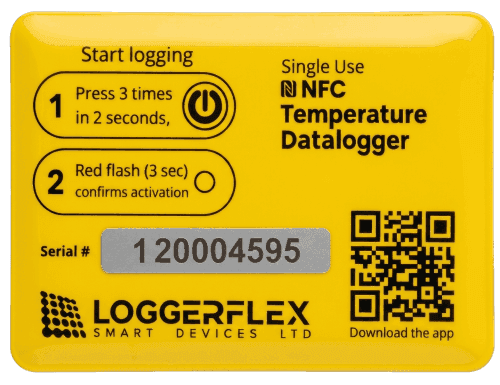
Press the button 3 times and drop it in the box. On arrival, a tap with an iPhone or Android phone uploads the whole trip to your cloud account. Out of range? Your team gets an email at the scan.
Three differences you notice at the dock
A phone, not a PC
Read it with an iPhone or Android phone and the free app. No dock computer, USB port or Windows software. View the data on a Mac, PC or phone, from anywhere.
Waterproof, even submerged
Put it in ice slush, a wet seafood tote or a water bath. It sits right next to the product, wet or dry, and there is no port to keep dry.
Data goes to your team, not a phone
A scan uploads the trip to your cloud account, not to a file on the receiver's phone. Everyone you share with sees it, and gets an email and push alert at the scan if anything was out of range.
6 am, a pallet arrives. Where does the temperature data go?
Same pallet, same logger in the box. What happens next depends on how the data comes off the logger and who sees it before the product is put away.
USB/PDF logger
- 1Receiver looks for a computer with a free USB port
- 2Plugs in the logger and waits for the PDF
- 3Saves the file, then emails it to QC
- 4QC reads it hours later, if the email was sent
The record sits on one dock computer and in someone's inbox.
Phone-export NFC logger
- 1Receiver taps the logger with a phone
- 2A PDF or CSV is saved on that phone
- 3Receiver has to email or text it to QC
- 4QC checks it when the file arrives, if it arrives
The record stays on one person's phone unless they forward it.
MaxLinc NFC
- 1Receiver taps the tag with the free app
- 2The whole trip uploads to your cloud account
- 3Out of range: email and push alert to your team
- 4In range: no alert, the trip is filed
QC hears at the moment of the scan, and nobody has to send a file.
Alerts at the scan, not on the road
No alert after a scan means every reading was in range
Set your alarm limits when you order. Your team then hears about a shipment when a reading was out of range, and every scanned trip is filed either way.
- 01
Activate
Press the button 3 times. A red flash confirms it started. Nothing to set up at the shipping end.
- 02
Pack it
Drop it in the box, tote or pallet. It starts recording after your start delay, 10 minutes as standard.
- 03
Scan on arrival
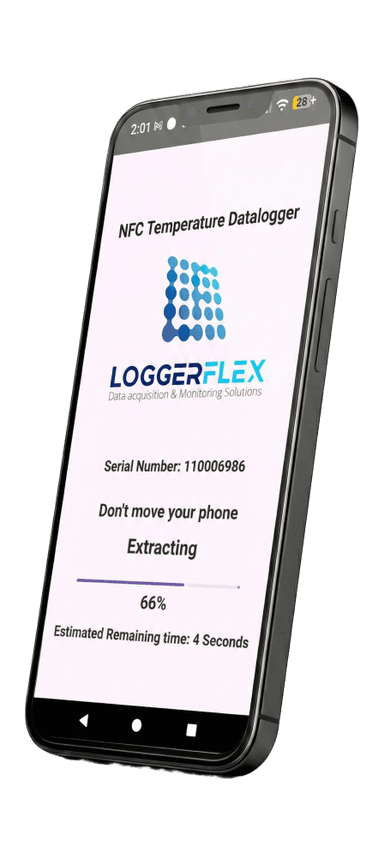
The receiver taps it with the free app. The whole trip uploads to your account. No login, no file to send.
- 04
Keep the record
Open the chart, the scan location or a PDF or Excel report on a Mac, PC or phone whenever an auditor or customer asks.
In range: no alert
No alert after a scan means no reading was outside your limits. The trip is still filed, so you can see every shipment was scanned.
Out of range: everyone knows
An email and push alert go to everyone you share with at the moment of the scan, so you can decide on the product before it is put away.
Free web app
Every trip on a chart, with where it was scanned
Open app.maxlinc.com on a Mac, PC or phone. Each tag has its own page: the full temperature chart, minimum, average and maximum, and where it was scanned.
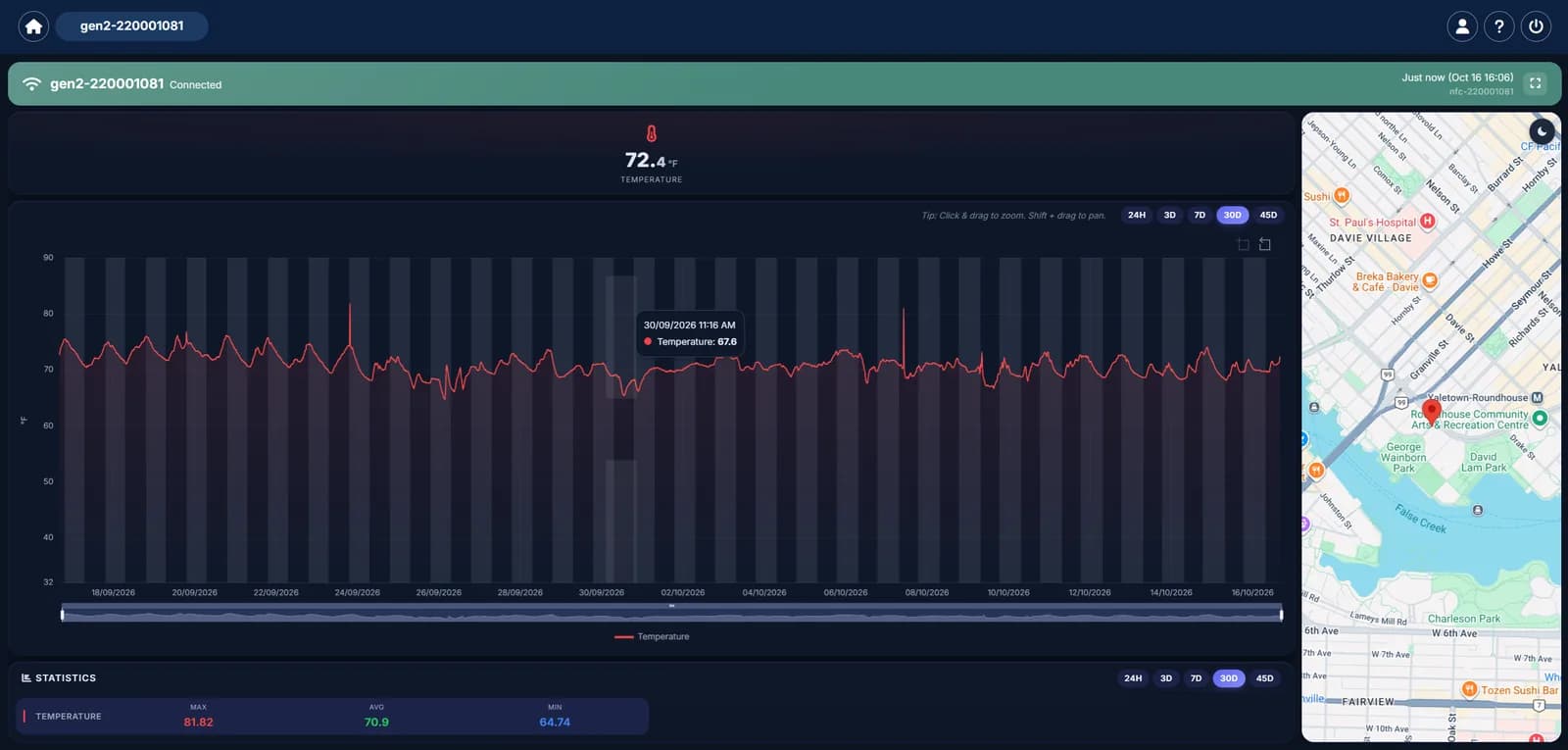
See where each tag was scanned
With location turned on, the app sends the phone's position with each upload and the web app pins it on a map. It shows where and when the tag was read, not the route.
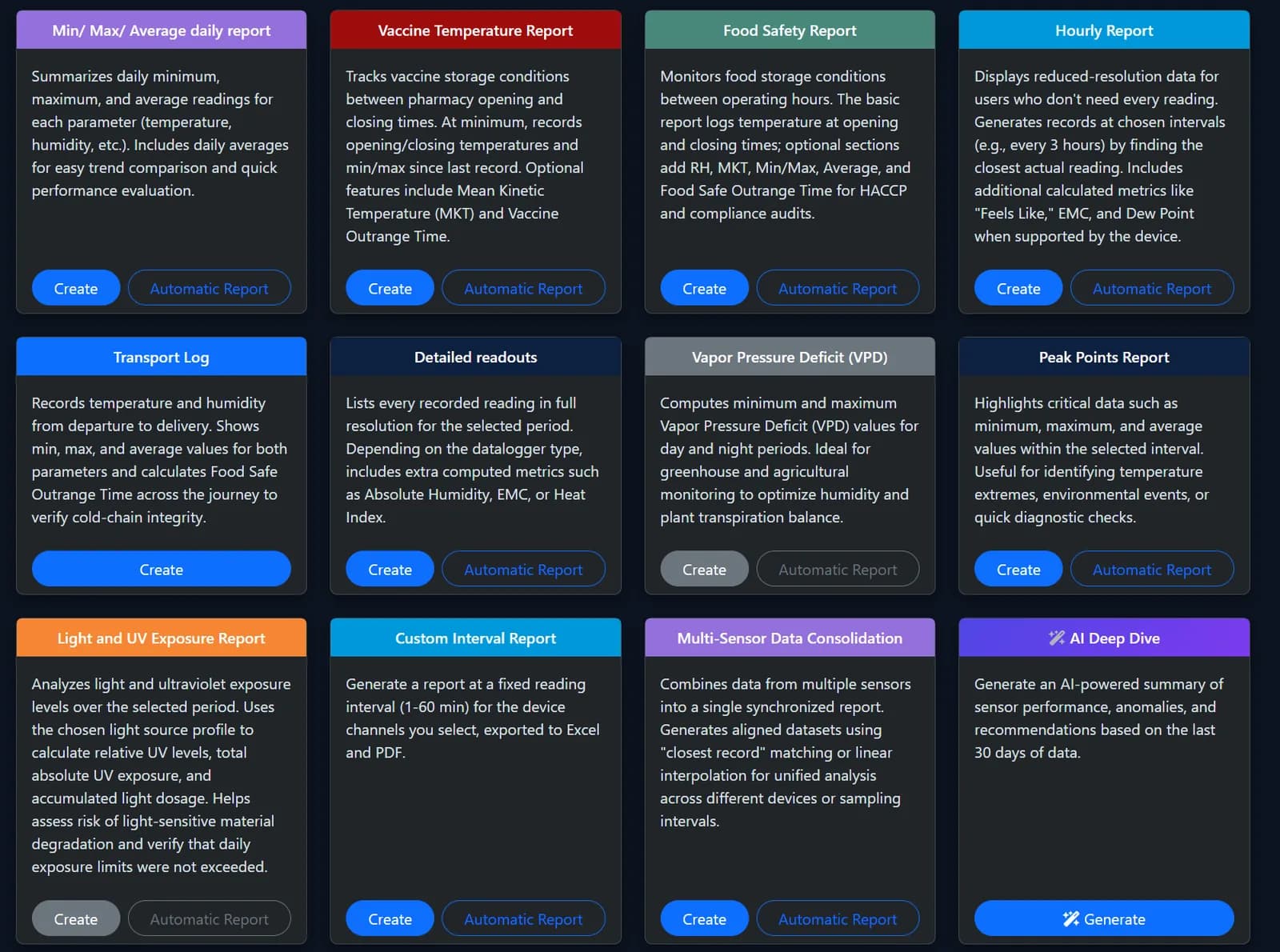
10 report types, in PDF and Excel
Run any report when an auditor or customer asks, or set most of them to run automatically. All free.
- Daily minimum, maximum and average
- Vaccine temperature, with MKT
- Food safety
- Hourly
- Transport log
- Detailed readouts
- Peak points
- Custom interval
- Multi-sensor consolidation
- AI Deep Dive
Several tags, one report: temperature mapping
Place tags at different spots in a truck, cooler, warehouse or room, then scan them. The multi-sensor report puts them side by side in one PDF or Excel report: a low-cost way to find warm and cold spots.
Free custom setup
Programmed for how you ship, free
Tell us how you ship and our team in Canada sets every tag before it leaves. Nothing for you to install or configure, and no extra charge.
Start delay
Time to pack before recording starts: none, minutes, hours or days. Standard is 10 minutes after activation.
Recording interval
Standard is every 10 minutes, or anything from 1 minute to 24 hours. A longer interval stretches the 4,000-reading memory.
Alarm limits
Low, high or both, e.g. 2 °C to 8 °C (36 °F to 46 °F) for vaccines. Any reading outside them triggers email and push alerts at the scan.
Continuous mode
Keeps recording when memory is full, overwriting the oldest reading. Scan it at least once per memory cycle and the cloud keeps every reading.
Red alarm LED
The tag flashes red after an out-of-range reading, so the receiver sees a problem as they open the box, before scanning.
Waterproof: put it in the ice, not on the lid
Many single-use USB loggers are not made to sit in liquid. This tag is waterproof and can be submerged, so it can go right next to the product, in ice slush, a wet tote or a water bath. It reads by tap, so there is no port to seal.
- Seafood boxes packed in ice
- Produce totes and hydrocooling
- Meal kits with melting gel packs
- Samples in water baths
One tag, about a year on a fridge or cooler
In continuous mode the tag keeps recording when memory is full, overwriting the oldest reading. Scan it at least every 4 weeks (at 10-minute readings) and the cloud keeps every reading. One tag covers a fridge, cooler or returnable tote for about a year.
Share the account with as many people as you like, free.
MaxLinc NFC vs typical single-use loggers
All three record the trip and none of them alerts you on the road. The difference is how the data comes off, where it ends up, and who sees it.
| What matters | MaxLinc NFC | USB/PDF logger | Phone-export NFC logger |
|---|---|---|---|
| How you read it | Tap with an iPhone or Android phone and the free app | Plug it into a computer's USB port | Tap with a phone and the brand's app |
| Computer at the dock | None. View the data on a Mac, PC or phone | A computer with a free USB port; software is often for Windows | None |
| Where the data ends up | Your cloud account, uploaded at the scan | A PDF on the computer that read it | A PDF or CSV on the phone that scanned it |
| Getting it to QC | Automatic: everyone you share with sees it, with the scan location | Someone emails the file | Someone emails or texts the file |
| Out-of-range alerts | Email and push alert to your whole team at the scan | Whoever opens the PDF has to spot it | Usually shown on the scanning phone |
| Wet or submerged | Waterproof, can be submerged | Many are not made for immersion | Varies by brand |
| Ongoing fees | None, ever | Usually none | Cloud upload is often a paid plan |
| Custom setup | Free: delay, interval, limits, full-memory mode, red LED | Varies by brand | Varies by brand |
| Cost per logger | $11.98 in a box of 50 | Typically US$9 to US$30 | Varies by brand and pack size |
The USB/PDF and phone-export columns describe typical products; features vary by brand. Our tags come in boxes of 50. If you ship a few parcels a year, or your receivers want a PDF on a computer, a USB/PDF logger may suit you better.
NFC temperature logger: questions
Which phones can read it?
An iPhone or an Android phone with NFC, running the free MaxLinc NFC app (listed as LoggerFlex NFC Tag Reader on the App Store and Google Play). The iPhone app needs a recent version of iOS, so check the App Store listing before you equip your receivers. No PC and no USB cable are needed.
Where does the data go, and who sees it?
The app on the scanning phone is set once to the email address of your MaxLinc cloud account, for example your QC manager's. From then on every scan from that phone uploads the whole trip to that account. The person scanning needs no login or password. Share the account with as many people as you like, and they can open the chart, statistics and reports on a Mac, PC or phone, from anywhere. A receiver at another company installs the free app and enters your account email once.
When do the alerts go out?
At the moment of the scan, if you set at least one alarm limit. If any reading in the trip was outside your limits, everyone the account is shared with gets an email and a push notification. The tag has no radio for use on the road, so there are no alerts during the trip. No alert after a scan means every reading was in range, and the trip is filed in your account either way. A tag that is never scanned uploads nothing, so its trip will not appear in your account.
What can I see in the web app, and can I map a room?
Each tag has its own page at app.maxlinc.com with the full chart, the minimum, average and maximum, and, with location turned on in the app, a map pin where it was scanned. The pin shows where the tag was read, not the route it took. Reports come in PDF and Excel: daily minimum, maximum and average, vaccine temperature with MKT (mean kinetic temperature), food safety, hourly, transport log, detailed readouts, peak points, custom interval, multi-sensor consolidation and AI Deep Dive. Most can be set to run automatically. The multi-sensor report combines several tags in one report, so tags placed around a truck, cooler, warehouse or room give you a low-cost temperature map. All of it is free.
What if the receiver has no signal?
The upload needs mobile data or Wi-Fi. If the dock has no signal, scan the tag again once the phone is connected.
Is there a subscription?
No, and there never will be for NFC tags. The app, the cloud account, sharing with unlimited people, out-of-range alerts, the full history and all PDF and Excel reports are free.
Can it get wet?
Yes. It is waterproof and can be submerged, so it can go in ice slush, wet seafood totes, produce containers or a water bath. It is read by tapping, so there is no port to seal.
How does the free custom setup work?
Choose Custom setup on this page before you add the tags to your cart: start delay, recording interval, low and high alarm limits, what happens when memory is full, and the red alarm LED. Our team in Canada programs every tag before shipping, at no extra charge. You can order different setups in one order, and volume pricing still counts every box together. If you choose nothing, you get the standard setup.
What is continuous mode?
Instead of stopping when its 4,000-reading memory is full, the tag keeps recording and overwrites the oldest reading. Scan it at least once per memory cycle (about every 4 weeks at a 10-minute interval) and the cloud keeps every reading. One tag can then build a history of about a year on a fridge, a cooler, a returnable tote or a storage room.
What does the red LED do?
If you choose the red alarm LED, the tag flashes red after any reading outside your alarm limits. The receiver sees there was a problem as soon as they open the box, before they scan. It needs at least one alarm limit.
How long do the battery and memory last?
The battery lasts about 1 year after activation. The memory holds 4,000 readings: about 4 weeks at the standard 10-minute interval, or longer with a longer interval. It measures from -20 °C to +70 °C (-4 °F to +158 °F) with an accuracy of ±0.5 °C (±0.9 °F).
Is it single-use or reusable?
For shipments it is single-use: one tag per one-way trip, activated with 3 presses of the button. In continuous mode, one tag can stay on a fridge, cooler or returnable tote for about a year. For alerts during the trip on your own vehicles, see our EDGE Cellular devices.
You May Also Like
View All
Customer reviews
Be the first to review this product.
Leave a review
Used MaxLinc? We would love to hear from you. Reviews are checked before they go live.
Prefer Google? Review us on Google(opens in a new tab)