MaxLinc Cellular Water Meter
Quick-start & owner’s guide — everything you need, no water-meter experience required.
Your meter reads itself
The MaxLinc Cellular Water Meter measures water with ultrasound — there are no gears or paddles to wear out or clog. It sends every reading over the mobile network on its own, using a SIM that is already inside and fully managed by us. There is no Wi-Fi to join, no gateway, and no wiring. Once your plumber fits it, your water use simply appears on your dashboard — you rarely need to touch the meter at all.
In the box
- MaxLinc cellular water meter (with SIM and data plan already inside)
- Sealing washers for the pipe connections
- Quick-start card
Where to buy
Each size’s product page shows its current price and stock. Choose the size of the line: DN20 for a 3/4 in (20 mm) line, DN25 for a 1 in (25 mm) line.
At a glance
Connectivity
4G LTE cellular — SIM built in
Measurement
Ultrasonic — no moving parts
Accuracy
Class 2 (ISO 4064 / OIML R49)
Battery
Sealed lithium — 6-year life
Protection
IP68 — submersible & buried
Sizes
DN20 (3/4 in, 1" NPSM thread) & DN25 (1 in, 1¼" NPSM thread)
Meet your meter

- 1
Protective flip-lid — lifts up to reveal the display; keep it closed in normal use.
- 2
LCD display — shows your total water used and other readings.
- 3
Touch button — the finger-touch icon — tap to wake the screen and cycle readings.
- 4
Threaded connection — inlet & outlet screw into your pipe; the arrow on the body shows flow direction.
- 5
Tamper seal — shows the meter has not been opened.
- Built-in cellular: the SIM and antenna are inside — no Wi-Fi, gateway or wiring.
Reading the display
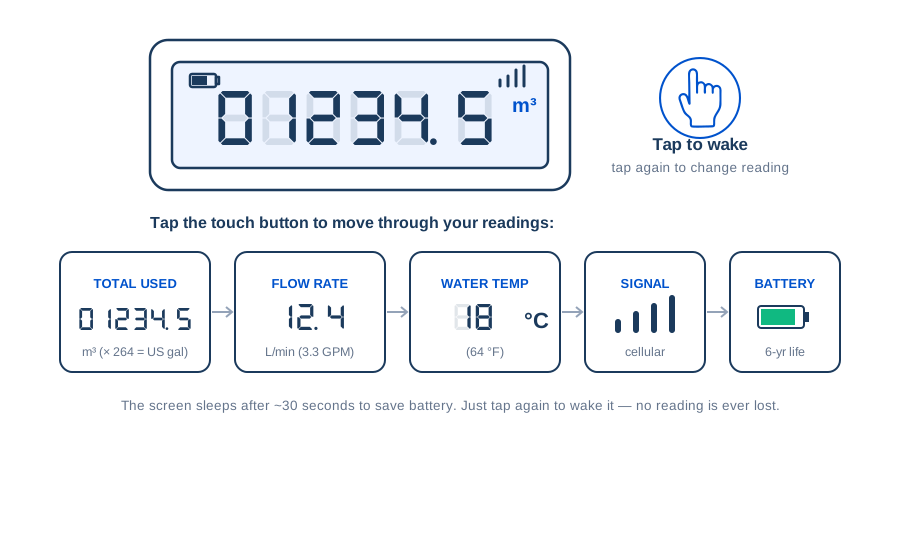
- The screen sleeps to save battery. Tap the finger-touch button once to wake it.
- Tap again to move to the next reading: total used → flow rate → water temperature → signal → battery.
- The number you normally want is TOTAL USED, shown in cubic metres (m³).
- After about 30 seconds it sleeps again. No reading is ever lost.
Metric & imperial
The meter reads in metric. To convert:
- 1 m³ = 1,000 litres = 264 US gallons = 35.3 cubic feet
- 1 L/min ≈ 0.26 US gallons per minute (gpm)
- °F = (°C × 1.8) + 32
How your meter reports to you
Your meter sends its readings automatically over the same mobile network your phone uses. Anywhere there is cellular signal, it comes online and reports straight into MaxLinc — no Wi-Fi, no gateway, no wiring, nothing to configure. You watch everything from the app and dashboard.
Cellular, built in
A 4G eSIM is already inside, with unlimited international data. It connects on its own wherever there is cellular signal.
See it anywhere
Consumption, leaks and alerts sync to the MaxLinc app and to app.maxlinc.com, hosted in Canada.
Connectivity included
No subscription fee for the first 5 years, then about $8.89 a year per meter (about 74¢ a month), billed annually. Unlimited international data is included, with no separate SIM to buy.
Getting started — see your first reading
There is nothing to pair or set up on the meter itself. You reach your data through the MaxLinc platform:
- 1Your distributor or utility links the meter to your MaxLinc account.
- 2Sign in at app.maxlinc.com or open the MaxLinc app on your phone.
- 3Your meter appears on the dashboard and reports on its own — usage, leaks and alerts show up automatically.
Alerts & what they mean
Your meter watches for problems and can raise an alert in the MaxLinc app. If you ever look at the meter itself, the same problem shows on the display as a code (E1–E8) — this table tells you what each one means in plain terms.
| Code | Alert | What it means | What to do |
|---|---|---|---|
| E1 | Low battery | The sealed battery is near the end of its life. | Contact support before you replace the battery: it is sealed inside the meter, and replacing it (battery CAD 59) means breaking the factory seal. |
| E2 | Reverse flow | Water moved backward through the meter. | Have the flow direction checked — the meter may be fitted the wrong way. |
| E3 | Flow too high | Flow is above the meter’s maximum — it may be undersized for the pipe. | Contact MaxLinc to confirm the right size. |
| E4 | Possible leak / water running | The meter sees water flowing non-stop, even overnight. | Check for a running toilet, dripping tap, or hidden leak. |
| E5 | Burst pipe | A sudden very high flow that can signal a burst pipe. | Shut off the water and inspect the line. |
| E6 | Water temperature out of range | The water is outside the meter’s rated range — near-freezing (below about 0 °C / 32 °F) or hotter than 50 °C (122 °F). | Check the supply; fit a meter rated for the temperature. |
| E7 | Sensor fault | The meter reported an internal fault. | Contact MaxLinc or your distributor for service. |
| E8 | Empty pipe | There is no water in the pipe (supply is off, or air is trapped). | Normal after a shut-off; it clears on its own when water returns. |
Installation (for your plumber)
We recommend a licensed plumber fit the meter. It takes minutes and needs no power or configuration — the cellular link starts on its own.
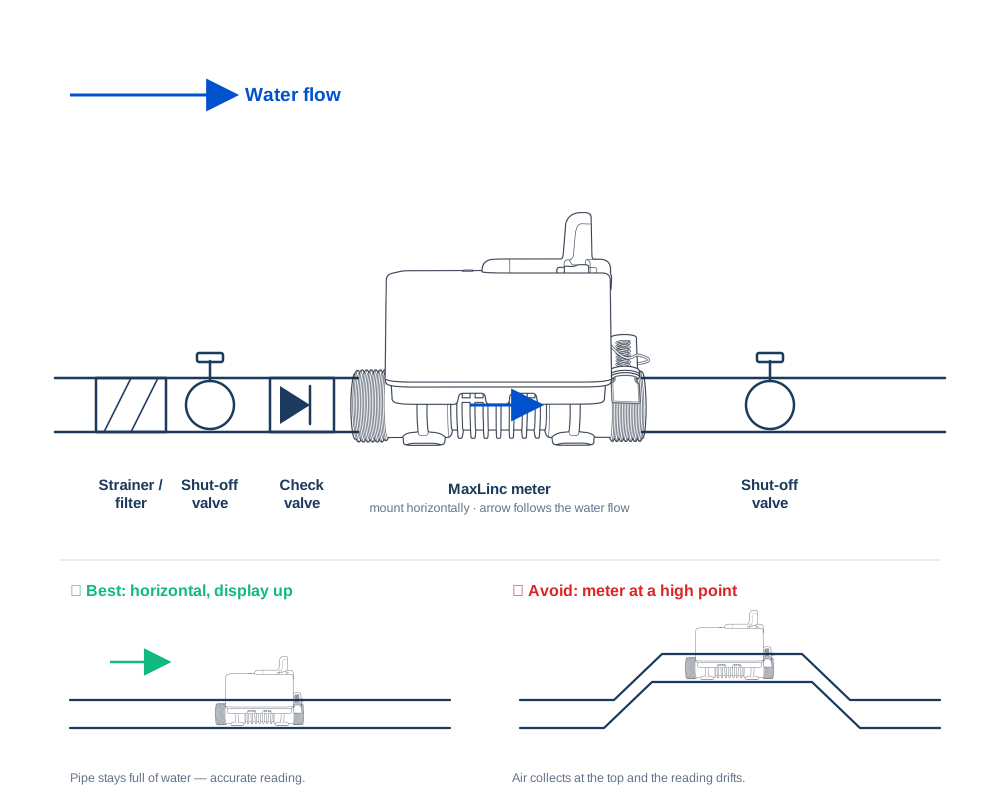
Do
- Point the flow-direction arrow the same way the water flows.
- Fit a strainer/filter, a shut-off (ball) valve, and a check valve before the meter — and a shut-off valve after it.
- Mount it horizontally with the display facing up (vertical with upward flow is also fine). Keep it at a low point so the pipe stays full.
- Leave a short straight run of pipe before and after the meter where you can.
- Flush the pipe before fitting — grit and debris can damage the sensor.
- Pressure-test and check for leaks once everything is connected.
- Outdoors or in a pit, use a lockable meter box. The IP68 body tolerates flooding.
- Before you close a pit or meter box, tap to the SIGNAL screen and confirm the meter shows bars (or appears online in the app). A metal lid or a deep buried vault can block the cellular signal — keep the meter near grade.
Don’t
- Do not use hemp / plumber’s rope as thread sealant — strands break off and clog the meter. Use PTFE tape or approved paste.
- Do not over-tighten the connections — hand-tighten, then a turn with a wrench.
- Do not pull or lift the meter by its cap or pipe — it is a precision instrument.
- The battery is rated for more than 6 years. It is sealed inside the meter: it can be replaced (replacement battery CAD 59), but that means breaking the factory seal, so contact support first.
Sizes & connections
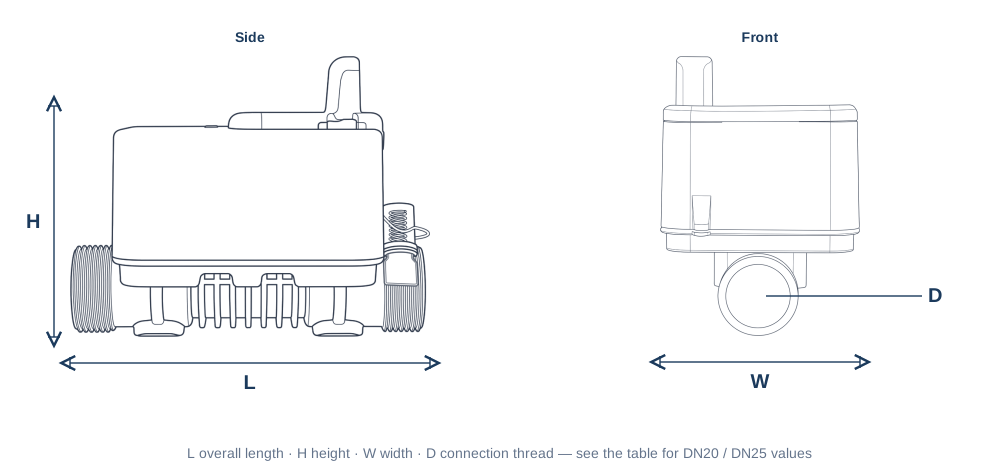
| Specification | DN20 | DN25 |
|---|---|---|
| Connection thread | 1" NPSM male | 1¼" NPSM male |
| Nominal flow (Q3) | 4.0 m³/h · 17.6 gpm | 6.3 m³/h · 27.7 gpm |
| Max flow (Q4) | 5.0 m³/h · 22.0 gpm | 7.875 m³/h · 34.7 gpm |
| Start flow | 2.5 L/h · 0.66 gal/h | 4 L/h · 1.06 gal/h |
| Overall length | 130 mm · 5.1 in | 160 mm · 6.3 in |
| Height | 99 mm · 3.9 in | 105 mm · 4.1 in |
Both sizes share the same cellular electronics, managed SIM, IP68 rating and sealed 6-year battery.
Battery & care
- The sealed lithium battery lasts more than 6 years. There is nothing to charge and no mains power.
- When the meter reports a low battery, contact support first: the battery can be replaced (replacement battery CAD 59), but that means breaking the factory seal.
- No routine maintenance: with no moving parts there is nothing to wear, jam or clog.
Where it can go
- IP68 rated — it can be buried or sit in a pit that floods.
- Works in ambient −25 to +55 °C (−13 to +131 °F). Protect the pipe from freezing where water could freeze.
- Keep away from strong vibration, chemicals and continuous direct heat.
- Store dry, off the ground, away from heaters, at −25 to +55 °C (−13 to +131 °F).
Specifications
Measurement
Ultrasonic transit-time — zero moving parts
Accuracy
Class 2 (±5% low zone, ±2% high zone)
Metrological range
R250 standard (R400 available)
Resolution
0.0001 m³ (0.1 L · 0.026 gal)
Metering
Two-way, with reverse-flow detection
Water temperature
0.1–50 °C (32–122 °F), class T30/T50
Max pressure
MAP16 — 16 bar (232 psi)
Operating ambient
−25 to +55 °C (−13 to +131 °F)
Ingress protection
IP68 — submersible / buried
Connectivity
4G LTE cellular · built-in managed SIM
Battery
Sealed 3.6 V lithium, >6-year life
Body
Lead-free composite, potable-water safe
Activate your online account
Register your meter to unlock the full MaxLinc dashboard — daily readings, consumption reports, charts, alarms and smart anomaly detection, from your phone or any web browser. It takes about a minute.
Register in three steps
- 1Go to app.maxlinc.com and create a free account — or sign in if you already have one.
- 2Choose “Add meter” and enter the Serial number and DUID printed on the sticker on the side of your meter.
- 3That’s it — the system recognises your meter and guides you through the rest automatically. Your readings appear within minutes.
What you unlock online
Daily readings & history
Your current reading and full consumption history, updated automatically.
Consumption reports
Daily, weekly, monthly and yearly reports you can view, export or share.
Charts
Clear graphs of how your water use changes over time.
Consumption alarms
Get notified when usage over a week or longer passes a limit you set.
Leak & burst alarms
The meter's own sensors flag leaks, bursts and reverse flow; the alarm reaches you with the next daily report.
Device & error alerts
No-upload and error-code (E1–E8) alerts reach you by email or text.
Setting up a consumption alarm
Open the alarm page for your meter, choose “Add Alarm Rule”, and set:
- Period — Weekly, Monthly or Yearly, a rolling window (Last 7 / 30 / 365 days), up to a specific time, or over a certain amount.
- Consumption/Value — the threshold in cubic metres (m³). You’re alerted as soon as use in that period goes over it, so leaks and overuse never slip by.
- Save. Add as many rules as you like — each appears in your Alarm Rules list and can be edited or removed anytime.
No-Upload Alarm
Tells you if the meter stops reporting.
Warning Alarm (error code)
Choose which device error codes should notify you.
Smart anomaly detection
Let the system watch for unusual patterns automatically — no threshold to set.
Warranty & support
Your meter carries a 2-year limited warranty against manufacturing defects from the date of purchase (invoice date). For warranty or service, contact MaxLinc or your distributor.
Not covered
- A broken or removed tamper seal.
- Damage from debris in un-flushed pipes.
- Misuse, or installation against these instructions.
- Freezing, lightning, chemical attack or other harsh-environment damage.
- Faults outside the meter, or events beyond our control.
Regulatory
This device complies with Part 15 of the FCC Rules. Operation is subject to the following two conditions: (1) this device may not cause harmful interference, and (2) this device must accept any interference received, including interference that may cause undesired operation.