EDGE Thermo Cellular User Manual & Setup Guide
Quick Start Guide & Device Reference
What's in the Box
- 1 × EDGE Data Logger
- 1 × Mounting sticker
- 1 × Probe(s)
- 4 × AA batteries (pre-installed)
Device Overview
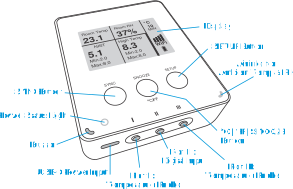
Step-by-Step Setup Guide
Follow these instructions to register your device, get it connected to the internet, and understand its daily operation.
Create Account & Register Device
- Go to app.maxlinc.com or Scan the QR on the display.
- Create and verify your account.
- If using a mobile device, log in and scan the QR code on the device screen again to auto-fill the Serial Number and DUID, or enter them manually.
Why register first?
The system will guide you through step-by-step configuration (recording intervals, sync intervals, alarm thresholds) and ensure the device can successfully connect to the MaxLinc cloud when it comes online.
Connect to the Internet
Cellular Connection
Your device connects to the internet via its built-in global eSIM. No SIM card is required.
- Simply press the SYNC button (left button) to attempt a connection.
- The device will automatically connect to the best available cellular network in 173 countries.
- Comes with unlimited data under a MaxLinc subscription.
WiFi Redundancy (Optional)
You can also configure WiFi as a redundancy with automatic rollover. If there is no WiFi it connects via cellular, and when WiFi returns it automatically switches back.
- Press the SETUP button (right button).
- Connect your phone/PC to the "Datalogger" WiFi network.
- A setup page will open. (If not, navigate to 8.8.8.8 in your browser).
- Choose your 2.4 GHz WiFi network and enter the password.
Connect Probes & Read Display
Port I & Port III (Temperature)
Plug in your external temperature probes here. The device auto-detects probe presence and updates the display accordingly. The device uses high-precision digital temperature sensors.
Port II (Digital Input)
Digital input for dry contact sources (not included), such as a door sensor, flood sensor, or external fridge alarm. Uses a 2-pole terminal to 3.5mm (1/8 in) audio jack adapter.
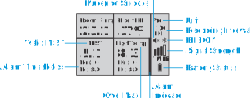
The display dynamically changes based on how many probes are connected:
- No Probes: Displays internal metrics depending on the device model.
- One Probe: Displays the connected probe reading prominently.
- Both Probes: Splits the screen to show both readings simultaneously.
- The display updates at each recording interval and pauses updates below 0°C (32°F) to preserve screen performance.
NIST Traceable Calibration
Your sensors come with a NIST traceable certificate. The MaxLinc system will automatically notify you by email when the certificate is about to expire, and again when it has expired.
You can also check the calibration status directly on the device screen. It will show a NIST icon, and alert you if the calibration is expired.
Buttons, Alarms & Daily Use
Button Functions
- Left (SYNC): Instantly sends data to the cloud.
- Middle (°C/°F/SNOOZE): Tap to toggle units. Tap during alarm to snooze buzzer. Hold for advanced metrics.
- Right (SETUP): Activates WiFi hotspot for configuration.
Alarms & Notifications
- Delivery: Email (Free), SMS, Phone Call, Audible Beep.
- Triggers: High/Low limits, Mold risk, Port II contact closure, power loss/restoration.
- Action: Alarms trigger an immediate sync. Recording interval shortens to 1 minute. Buzzer sounds for 5 seconds.
Status Icons: Top to bottom: Measuring Unit, Recording Interval, BLE/Mute icon, Signal Strength, Connection Type, Battery Level.
Power: Runs on 4 × AA batteries or USB-C 5V. Device automatically switches based on availability.
BLE Support: Both models broadcast BLE for real-time local viewing. A MaxLinc Gateway is required to capture BLE data, but is NOT required for standard logging and alarms (which use WiFi/Cellular).