EDGE Air WiFi User Manual & Setup Guide
Quick Start Guide & Device Reference
What's in the Box
- 1 × EDGE Data Logger
- 1 × Mounting sticker
- 4 × AA batteries (pre-installed)
Device Overview
Step-by-Step Setup Guide
Follow these instructions to register your device, get it connected to the internet, and understand its daily operation.
Create Account & Register Device
- Go to app.maxlinc.com or Scan the QR on the display.
- Create and verify your account.
- If using a mobile device, log in and scan the QR code on the device screen again to auto-fill the Serial Number and DUID, or enter them manually.
Why register first?
The system will guide you through step-by-step configuration (recording intervals, sync intervals, alarm thresholds) and ensure the device can successfully connect to the MaxLinc cloud when it comes online.
Connect to the Internet
WiFi Connection
- Press the SETUP button (right button).
- Connect your phone/PC to the "Datalogger" WiFi network.
- A setup page will open. (If not, navigate to 8.8.8.8 in your browser).
- Choose your 2.4 GHz WiFi network and enter the password.
⚠ Important WiFi Requirements:
- Device must be registered before setup.
- WiFi password is case-sensitive.
- Only supports 2.4 GHz WiFi with pre-shared key (WPA/WPA2). Uses dynamic IP (DHCP only).
- Cannot connect to networks requiring secondary login pages or captive portals.
Read Display & Ports
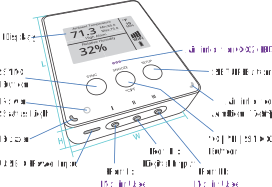
Port I & Port III (Not in Use)
These ports are disabled for EDGE Essential and EDGE Air models.
Port II (Digital Input)
Digital input for dry contact sources (not included), such as a door sensor, flood sensor, or external fridge alarm. Uses a 2-pole terminal to 3.5mm (1/8 in) audio jack adapter.
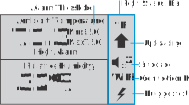
The display updates at each recording interval (not between 2 readings). It pauses updates below 0°C (32°F) to preserve screen performance.
CO2 Calibration (EDGE Air Only)
To calibrate CO2: Place outdoors, press Setup, connect to WiFi name "DATALOGGER", scroll and tap Setup. Wait 15 min without disturbing. Do this every 6–12 months or if readings seem off.
Buttons, Alarms & Daily Use
Button Functions
- Left (SYNC): Instantly sends data to the cloud.
- Middle (°C/°F/SNOOZE): Tap to toggle units. Tap during alarm to snooze buzzer. Hold for advanced metrics.
- Right (SETUP): Activates WiFi hotspot for configuration.
Alarms & Notifications
- Delivery: Email (Free), SMS, Phone Call, Audible Beep.
- Triggers: High/Low limits, Mold risk, Port II contact closure, power loss/restoration.
- Action: Alarms trigger an immediate sync. Recording interval shortens to 1 minute. Buzzer sounds for 5 seconds.
Status Icons: Top to bottom: Measuring Unit, Recording Interval, BLE/Mute icon, Signal Strength, Connection Type, Battery Level.
Power: Runs on 4 × AA batteries or USB-C 5V. Device automatically switches based on availability.
BLE Support: Both models broadcast BLE for real-time local viewing. A MaxLinc Gateway is required to capture BLE data, but is NOT required for standard logging and alarms (which use WiFi/Cellular).