NFC Microthermo (50-pack)
NFCMIC • NFC tags
Set it up
Do this first. A free account must already exist at app.maxlinc.com before the first scan. The phone app has no sign-up, login or password: it asks for an email address that is already registered and sends the scanned data to that account.
- Install the free MaxLinc NFC app, listed as LoggerFlex NFC Tag Reader on the App Store and Google Play. The links are in the NFC app guide.
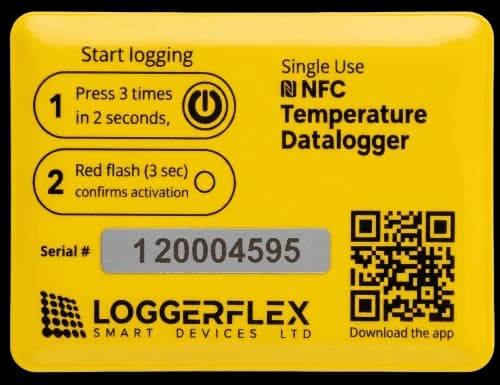
- Press the tag’s power button three times within two seconds. A red flash lasting three seconds confirms activation.
- Put the tag in its final spot within ten minutes: it waits ten minutes before its first reading.
- On first launch, choose the app’s language and a light or dark theme.
- Enter an email address already registered to a free app.maxlinc.com account.
- Lay the tag flat in landscape. On iPhone, overlap the phone’s top edge with the tag and press Start Scanning.
- On Android the app enters scan mode by itself: hold the top half of the phone over the tag, about 2 cm (1 in) below the top of the phone.
- Hold still until it reaches 100%, name the sensor if you wish, then press Upload with the phone online.
Things that trip people up
- Do not move the phone or the tag during a read. If the transfer is interrupted, start it again from the beginning.
- The ten-minute delay before the first reading is deliberate, so you can place the tag before logging starts.
- The person scanning does not have to be the account owner. The email address only decides which account receives the data.
- It records every ten minutes and holds about 4,000 readings, roughly four weeks, then overwrites the oldest. Battery life is two to three months.
- Uploading needs an internet connection on the phone. The account owner then opens the sensor card at app.maxlinc.com; PDF and Excel reports are under Advanced Reports, a Premium feature.
Warranty and service
Warranty, returns and replacements for this product follow our published policy.
Have this ready
- The Serial Number and DUID from the device label.
- Your MaxLinc order number or purchase date.
- What the device is doing, and what you expected it to do.
- A screenshot of the device card in app.maxlinc.com, if it is registered.
Then email Support@MaxLinc.com or call 1-888-365-8880.
Questions about this product
NFC loggers
What are the NFC loggers for?
They're disposable, single-use temperature loggers you drop into a parcel or shipment. On arrival, anyone can tap the tag using an iPhone or Android phone with the free NFC app to read the full temperature history and keep it with your shipping records — no gateway, and no account needed by the person scanning.
What app reads them, and how do they work?
The free MaxLinc NFC app, listed as LoggerFlex NFC Tag Reader on the App Store and Google Play. Activate a tag by pressing the button three times within two seconds; it records temperature every 10 minutes, holds about 4,000 readings (roughly four weeks) and runs 2-3 months. No login is needed to scan — a registered email routes the data to your MaxLinc cloud account.