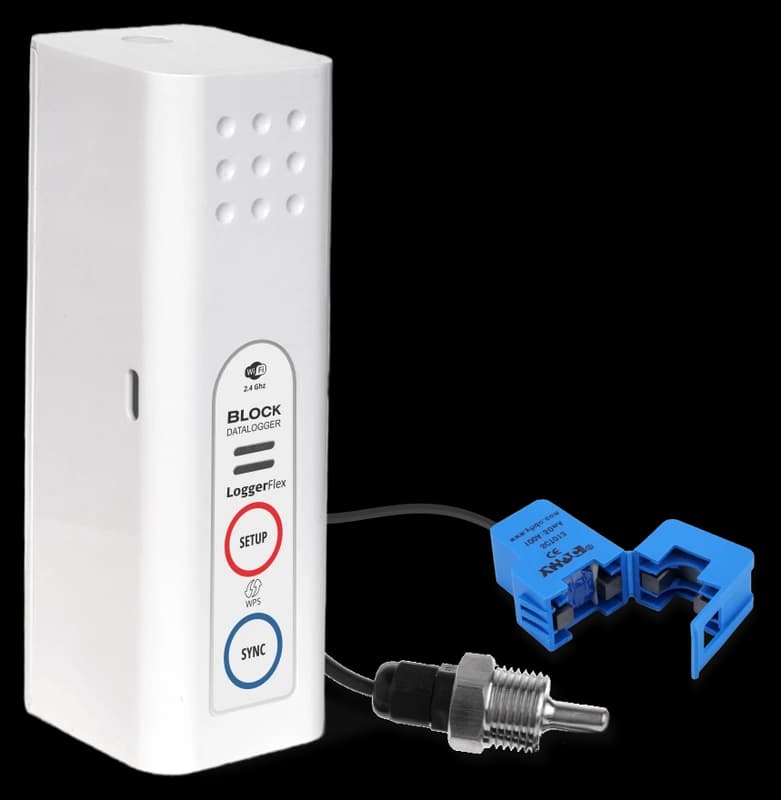
BLOCK Temperature + Current
BLXTCS • BLOCK
Set it up
Do this first. Add the device to your account before you power it up. Sign in at app.maxlinc.com, press + (Add Device), and enter the Serial Number and DUID from the label on the back of the unit.
- Before powering the device, open app.maxlinc.com in your phone’s or computer’s browser. It is a web app: there is nothing to download, and you can add it to your home screen.
- Sign in or sign up, then press the + (Add Device) button on your dashboard.
- Enter the Serial Number and DUID from the label on the back of the device.
- Press the SETUP button (the top button). The device broadcasts a temporary “Datalogger” network.
- Join that network from a phone, tablet or computer. If no page opens, browse to 8.8.8.8.
- Select your 2.4 GHz network, enter the password and connect.
- Let the device pull its logging settings, alarm thresholds and sync intervals from the cloud.
- Press the SYNC button (the bottom button) to check the connection and force an upload.
Things that trip people up
- BLOCK has two buttons: SETUP on top and SYNC at the bottom. This is not the three-button EDGE layout.
- Only 2.4 GHz networks are supported. 5 GHz is not compatible.
- To open the battery cover, press down firmly on the round release tab on top, then lift the back cover off from the top.
- Optional sensors, such as a dry-contact cable or a flood detector, are not in the standard package. The datasheet shows which port each one uses on your model.
In the box, and what you can add
Included
- External temperature probe — Waterproof, detachable digital probe on a 1.5 m (5 ft) cable, rated −55 °C to +125 °C (−67 °F to +257 °F). Reaches up to 15 m (50 ft) with 3 m (10 ft) extension cables.
- Split-core current clamp — Clips around a live conductor to log the load of a motor, compressor or circuit without breaking the circuit.
Available to add
- Probe extension cable, 3 m (10 ft) — Lets the logger sit outside the cold space it measures. A probe reaches up to 15 m (50 ft) with extensions.View in shop
- Dry contact cable — A 2-pole terminal to 3.5 mm jack adapter that brings any open/close contact, such as a door switch or a fridge alarm relay, into the digital input (Port II).Ask us
- Door magnet switch — Magnetic open/close switch for door-ajar alarms on fridges, freezers and cabinets. Connects through the dry-contact input.Ask us
- Silicone cover — Protective silicone sleeve for knock-prone spots such as loading docks, trucks and plant floors.View in shop
Add-ons with a “View in shop” link are sold in our online store. For the others, contact us and we will help you get them.
Warranty and service
Hardware Warranty
All MaxLinc EDGE and BLOCK environmental data loggers come with a 24-month limited warranty from the date the device is claimed (registered) to your MaxLinc account. The warranty covers defects in materials or workmanship under normal use and maintenance. If a product or part is found to be defective during the warranty period, we will repair or replace it at no charge.
What the warranty does not cover
- Consumable parts, such as batteries or hanger stickers.
- Cosmetic damage, including scratches or cracked or broken enclosures.
- Damage caused by accidents, abuse, misuse, liquid contact, fire, earthquakes or other external causes.
- Defects caused by tampering or repairs performed by unauthorized persons.
For replacement products or parts, the remaining warranty of the original product or 180 days from the date of replacement or repair, whichever is longer, will apply.
Have this ready
- The Serial Number and DUID from the device label.
- Your MaxLinc order number or purchase date.
- What the device is doing, and what you expected it to do.
- A screenshot of the device card in app.maxlinc.com, if it is registered.
Then email Support@MaxLinc.com or call 1-888-365-8880.
Questions about this product
Setup & connectivity
How hard is setup?
Tool-free and quick. For WiFi you connect the device to your network in the app and you're monitoring in minutes — no installer needed. Cellular units connect themselves over the built-in eSIM.
What are the WiFi requirements?
The device joins any standard 2.4 GHz network (it does not use 5 GHz). During setup you briefly connect your phone to the device's temporary hotspot, a setup page opens, and you pick your network and enter the password. A short beep pattern confirms success.
Is the data real-time?
Alarms are effectively real-time — a threshold breach uploads and alerts you immediately. Routine readings upload on a sync interval you choose (1 minute to 24 hours), set separately from how often the device records, so more frequent syncing gives finer data at the cost of battery.
What happens if the internet or power drops — do I lose data?
No. The logger keeps recording to internal memory while offline (tens of thousands of readings) and uploads everything it missed as soon as it reconnects, so your history has no gaps.
Battery & power
How long does the battery last?
About 2 years on 4 standard AA batteries for EDGE WiFi models, about 1 year for EDGE Cellular and about 2.5 years for BLOCK WiFi. Real-world life depends on how often it syncs, how much alarm activity there is, signal strength and temperature.
Can I run it on USB power instead of batteries?
Yes — EDGE and BLOCK units accept USB-C power and switch to it automatically when plugged in, falling back to batteries if external power is lost. That's ideal for permanent installations.
Will it warn me before the batteries die?
Yes. The device shows a low-battery indicator and the cloud sends a low-battery email alert. Always replace all the batteries at the same time with fresh, good-quality AA cells.
Alarms & alerts
How will I be alerted if something goes wrong?
By SMS text, automated phone call, email and mobile push notification, plus an audible buzzer and visible alarm on the device itself. Alerts repeat until the reading is back within your limits; anyone can acknowledge an alarm with a note, and the log keeps their name, the time and the comment.
Can I send alerts to more than one person?
Yes. Each person is added by sharing the device with them, and each controls their own text, call and push preferences. With Premium (included for the first year, and always included on cellular) you can add as many people as you like. On the free Standard tier, people already on the list keep their alarms, but adding someone new needs Premium.
Will I get flooded with false alarms?
No — the system has a four-level alarm engine: instant (threshold cross), persistent/delayed (only if the condition holds), trend/drift (warns before a limit is breached), and event-based (flood or door contact). Cumulative time-weighted alarms are also available, such as an 8-hour average CO2 exposure.
Will it tell me if a device goes offline?
Yes. A no-connection alarm notifies you if a device hasn't reported within an expected window, and low-battery and power-change alerts are also available.